









It works over Starlink. It doesn’t work without a connection.
Malvavisco is a web app. At a remote lodge that means it runs on whatever link you have, satellite included, and stops saving when the link drops. Here is what that looks like in practice, and how lodges plan around it.
Does Malvavisco work with Starlink?
Yes. Malvavisco is a web app, so it works over Starlink or any other satellite connection the way a website does. It needs that connection: there is no offline mode or native app yet. When the kitchen screen stops getting fresh data, it disables its buttons instead of letting staff act on old orders.
What a satellite link means for the staff app
This page is for lodges on satellite links: Alaska fly-in lodges, Canadian outposts and eco and wilderness lodges far from the nearest cable.
Everything runs in the browser
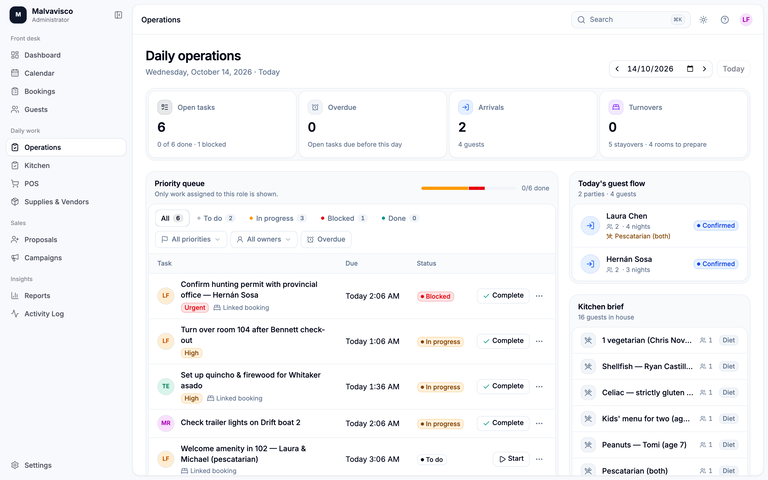
Bookings, the calendars, the kitchen, the point of sale and the reports all live on Malvavisco’s servers and open in a web browser on a laptop, tablet or phone. Nothing is installed at the lodge, so there is no local server to maintain, and no local copy to fall back on when the link is down.
On Starlink and other satellite links
Daily work is text and tables, not video or large files. On a slow or high-latency link, screens take longer to open, but they work as long as the link is up. A steady connection matters more than a fast one. We don’t publish a minimum speed because we haven’t measured one we could stand behind.
When the link drops
- The page that is open stays on screen, but nothing new is saved until the connection returns. Repeat a save that failed once you are back online.
- If someone else changed the same booking in the meantime, Malvavisco asks you to reload rather than overwrite their change.
- The kitchen screen checks for new tickets every few seconds. When updates stop arriving, it shows that its data is stale and disables its buttons, so nobody marks an order ready from an old list.
- A point-of-sale sale that is sent again after a dropped connection is still posted once, not twice.
Plan for the day the link goes down
- Have a second way online. A cellular hotspot where there is signal, or a second satellite service, with the router and dish on a battery backup.
- Print tomorrow’s grid the night before. The calendar prints the places, crew or assets grid; pin it in the guide room.
- Write tomorrow’s kitchen sheet the night before. Copy the meal counts and dietary notes onto a prep list, so breakfast doesn’t depend on the dish.
- Export what you’d need in a long outage. Arrivals, departures and balances export as XLSX or CSV.
- Keep a paper log. Note bar sales and payments taken during an outage, and enter them on the bookings when the link is back.
Connectivity, plainly
| Feature | Malvavisco | How it works |
|---|---|---|
| Works over Starlink and other satellite internet | Yes | Like any website, while the link is up. |
| Works on a cellular hotspot | Yes | Any internet connection works. |
| Laptop, tablet or phone browser | Yes | Nothing to install; a current web browser is enough. |
| Kitchen screen protection when data goes stale | Yes | Its buttons disable rather than act on old orders. |
| Edit conflicts caught | Yes | A second person’s change isn’t silently overwritten. |
| Printable calendar grid | Yes | Print tomorrow’s places, crew or assets grid the night before. |
| Exports for a paper backup | Yes | Reports export as XLSX or CSV. |
| Offline mode | No | Nothing can be opened or saved without a connection. |
| Native or installable app | No | It runs in the browser only. |
| Sync of work done offline | No | Enter it once the connection is back. |
| Local server at the lodge | No | Everything runs on Malvavisco’s servers. |
Who should choose an offline-capable tool instead
Choose something else if the lodge goes days without any connection, or if the work that matters happens where there is no signal: guides logging the day on the river, or hunters signing waivers in a camp with no service. Some tools advertise offline features on their own websites (checked on 23 October 2026):
- Fishing Outfitter describes itself as an installable web app (PWA). On its Solo plan and up, guides can file fishing reports and shopping items without signal, and they upload once back in coverage; pages already loaded stay viewable. Source
- Hunt Outfitter lets guides file harvest reports and field notes without cell service on its Solo plan and up. Source
- HuntDocs waivers can be signed in camp with no service once the form is loaded while you have signal; forms that take payment need a connection. Source
These are offline features for particular jobs, not a whole lodge office without internet. Compare the wider options in the best fishing lodge software and the best hunting lodge software.
Remote lodges ask us
Yes. It is a web app and works over Starlink or any other satellite connection, as long as the link is up.
No. Malvavisco needs an internet connection to open or save anything. There is no offline mode or native app today, and we don’t promise a date for one.
We don’t publish a minimum speed. Daily work is text and tables rather than video, so a steady connection matters more than a fast one; on a slow link, screens take longer to open.
The sale isn’t saved until the connection returns, so try again once you are back online. A sale that is sent again is still posted once, not twice.
A second connection, such as a cellular hotspot or a second satellite service; tomorrow’s calendar grid and kitchen sheet, printed the night before; and a paper log of sales and payments taken during an outage.
Some tools advertise offline features for particular jobs: Fishing Outfitter for guides’ fishing reports, HuntDocs for signing waivers in camp. Check each vendor’s own page for exactly what works without signal.