










The bar tab goes on the booking, not on a notepad.
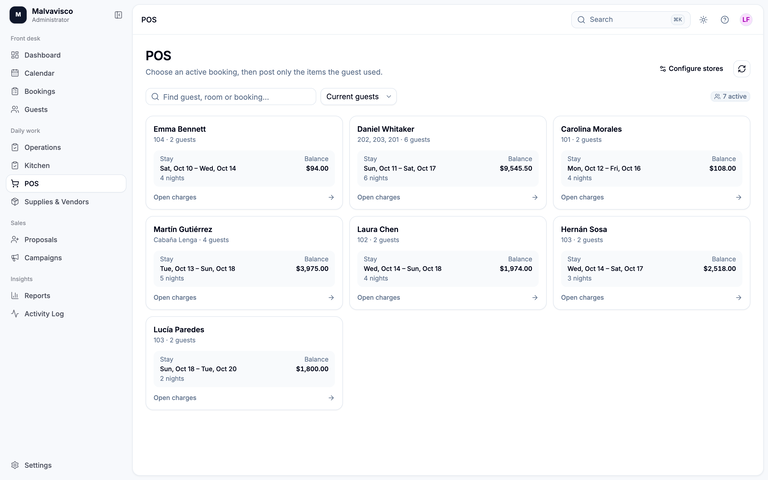
Malvavisco’s point of sale charges drinks, flies, caps and processing fees straight to the guest’s booking, moves stock once, sends what needs preparing to the bar or kitchen, and leaves one statement to settle at checkout.
What is a lodge POS system?
A lodge POS system records what guests buy at the bar, the fly shop or the gift shop and charges it to their stay, so the bill at checkout is complete. Malvavisco’s point of sale posts each sale to the booking, counts stock and sends drinks to the bar as tickets. It doesn’t process cards.
From the bar to the checkout statement
- 01
Open the store
Pick the bar, the fly shop or the gift shop. Each store has its own products and its own stock location.
- 02
Choose the booking
Find the guest’s booking, and the guest within the party if the charge is theirs alone.
- 03
Add the items
Saving posts the sale to the booking’s bill and moves stock once. For stock-tracked items, a sale that would take stock below zero is refused, so the counts stay honest.
- 04
Prepare it
Cocktails, coffee or a cake go to the bar or kitchen as tickets; bottled drinks and retail goods are simply charged.
- 05
Settle at checkout
The booking’s statement shows every charge. Staff record the payment, cash, transfer or card terminal, with a receipt.
A point of sale that belongs to the stay
What happens to a sale, and the parts that stay outside Malvavisco.
Sales charged to the booking
Every sale belongs to a booking and lands on its bill in the booking’s currency, with your tax rules applied. Charge it to one guest or to the party. A posted sale is never edited: more items are a new sale and corrections are made on the bill, so the history stays readable. It works the same in a fishing lodge fly shop, a hunting camp bar or a guest ranch saloon.
Stock and par levels
Turn on stock tracking for the products you count: beer, wine, spirits by the bottle, flies, caps. Record counts when you do a stocktake, and set a par level so the stock screen shows what to reorder.
Supply orders and receipts
Supply orders go to your vendors by email. When the delivery arrives, receive it once and the stock goes up; the order keeps a record of what came in. The kitchen uses the same supply orders.
The checkout statement
The booking shows rooms, guided days, bar and shop sales and payments on one statement, and prints a numbered invoice. The invoice is not a fiscal document.
Payments: recorded, not processed
Malvavisco does not process cards. Staff record payments taken in cash, by bank transfer or on your own card terminal, each with a receipt, and a reversal needs a reason. Mercado Pago payment links exist for bookings in Argentine pesos, but they have not been tested live yet.
What it doesn’t do
- No card processing or card-terminal integration
- No sale without a booking: a day visitor can’t run a tab
- No table service or open restaurant checks
- No barcode scanning
- No pour-level inventory: stock is counted by the bottle or can, not by the measure poured
- No offline mode (what that means on satellite internet)
Malvavisco and LodgeRunner at the bar
If you want to take cards at the bar from the same system, LodgeRunner does and Malvavisco doesn’t. LodgeRunner’s column comes from its own website, checked on 23 October 2026.
| Feature | MalvaviscoLodge software | LodgeRunner |
|---|---|---|
| Charges to the booking | Yes, every sale posts to the booking’s bill | Each transaction is saved to the corresponding bookingSource |
| Card payments at the bar | Not built in: staff record terminal, cash or transfer payments | Integrates with Square Terminal and Stripe TerminalSource |
| Bar screens | A store per counter (bar, fly shop, gift shop) with its own products and stock | Custom terminal screens made for touch screens, such as a Bar Tab screenSource |
| Split by guest | Charge one guest or the whole party | Assign transactions to individual guests; checkout statements per guestSource |
| Inventory | Stock per store location, par levels, supply orders and receipts | Reports for current inventory and items that need re-orderingSource |
| Barcode scanning | Not built | YesSource |
| Bar and kitchen tickets | Preparing, ready, served | Not mentioned on its retail pageSource |
| Price | Quoted after a demo | Most lodges $100–$300 a monthSource |
What the point of sale does, and what it doesn’t
| Feature | Malvavisco | How it works |
|---|---|---|
| Sales charged to the booking | Yes | Every sale lands on the guest’s bill, in the booking’s currency, with your taxes. |
| Charge one guest or the whole party | Yes | Pick the guest within the booking, or leave it on the party. |
| Several stores | Yes | The bar, the fly shop and the gift shop, each with its own products and stock location. |
| Bar and kitchen tickets | Yes | Items that need preparing go to the right station as tickets. |
| Stock counts | Yes | Stock-tracked items can’t be sold below zero; stocktakes record the difference. |
| Par levels | Yes | The stock screen shows items below par. |
| Supply orders and receipts | Yes | Orders emailed to vendors, deliveries received into stock once. |
| Checkout statement and invoice | Yes | A numbered, printable invoice; not a fiscal document. |
| Prices in several currencies | Yes | Products are priced per currency, so a CAD booking is charged CAD prices. |
| Card processing | No | Payments are recorded manually: cash, transfer or your own card terminal. |
| Card-terminal integration | No | The terminal and Malvavisco don’t talk to each other. |
| Walk-in sales without a booking | No | Every sale belongs to a booking. |
| Barcode scanning | No | Items are picked from the store’s product list. |
| Tip pooling | No | Record the gratuity as a payment and split it outside Malvavisco. |
| Offline sales | No | Note sales on paper during an outage and enter them later. |
A weekly bar inventory sheet for lodges
Download the lodge bar inventory sheet (CSV). It opens in Excel, Google Sheets or Numbers, and the Used and Value columns calculate themselves.
| Column | What goes in it |
|---|---|
| Item | The product as you sell it, such as a can of lager |
| Category | Beer, wine, spirits, soft drinks, snacks, retail |
| Unit | Bottle, can, each |
| Par level | The count you want on the shelf before the next supply run |
| Opening count | What you counted at the start of the period |
| Received | Deliveries during the period |
| Closing count | What you counted at the end |
| Used | Opening + received − closing |
| Cost per unit | What you paid per unit |
| Value | Closing count × cost per unit |
Count at the same time each week, before the bar opens. Anything below par goes on the next supply order; at a fly-in lodge, order for the days until the next plane, not the next week. Compare Used with what the point of sale charged: the gap is waste, staff drinks or a missed charge. If the group leaves one gratuity for the staff, the tip pool calculator splits it.
Lodges ask us about the bar
Yes. Every sale is charged to the guest’s booking, to one guest or the whole party, and appears on the checkout statement with the room and the guided days.
No. Card processing is not included. Staff take the payment on your own card terminal, in cash or by transfer, and record it in Malvavisco with a receipt.
Yes, by product: the bottles, cans and other items you buy and sell. Record stocktakes and supply receipts, and set par levels to see what to reorder. Tracking measures poured from a bottle is not built.
Not yet. Every sale belongs to a booking; there is no walk-in sale or table check.
A resort POS usually runs restaurants and shops with table service and card terminals. A lodge POS charges a small bar and shop to the guest’s stay so everything is settled once at checkout. Malvavisco is the second kind.
No. Malvavisco needs an internet connection. If the link drops, note sales on paper and enter them on the booking when it is back.