









The right guide and the right boat, and nobody booked twice.
Malvavisco lets you sell the guided day when the party books and assign the guide, the boat, the horses or the truck later, checking overlaps, capacity, skills and languages every time. Then it puts the week on a calendar you can print for the guide room.
What is guide scheduling software?
Guide scheduling software assigns each guided day to a named guide and the boats, horses or vehicles it needs, and refuses an assignment that overlaps or doesn’t fit. In Malvavisco, the activity is sold on the booking first and scheduled later, with capacity, skills and languages checked, and scheduling never charges twice.
From the booking to the guide room wall
- 01
Sell the activity
Add guided fishing days, hunts, trail rides or excursions to the booking at your per-person price. Selling doesn’t hold a guide yet.
- 02
Schedule it
From the booking or the operations board, give each outing a date and time, a named guide and the assets it needs, with the required categories listed first.
- 03
Let the checks run
A guide or asset already assigned for those hours, blocked, or outside its working hours is refused, and so is a plan that lacks the required skills, languages or seats.
- 04
See the week
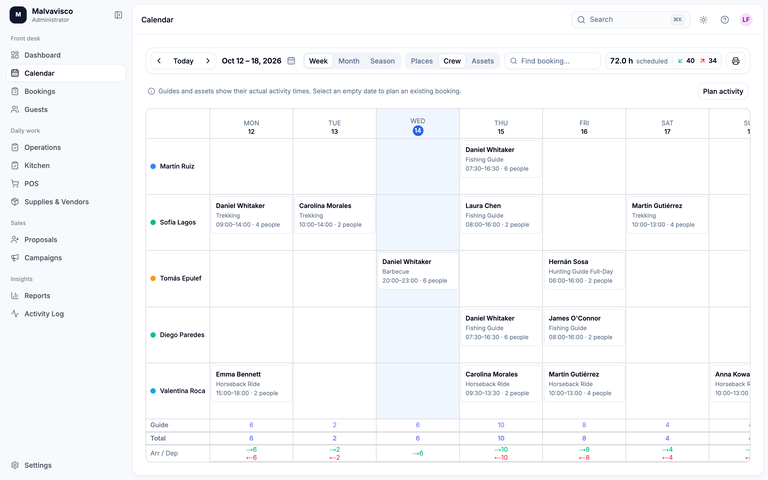
The crew and assets calendars show every assignment by week, month or six-month season. An empty cell opens planning for an activity already sold.
- 05
Print the grid
Print tomorrow’s crew or assets grid for the guide room, the dock or the barn.
Guides, boats and horses on one set of calendars
How an outing goes from sold to scheduled, and the limits worth knowing.
Sell first, assign later
A party books five guided days in March; the guides are planned the week before. Activities are services on the booking with your own per-person price, so the bill is right from the start. Scheduling attaches the date, guide and assets, and never adds a second charge, so moving a hunter to the afternoon sit or swapping a sick guide changes the schedule, not the bill. It works the same at a fishing lodge or a hunting lodge. Pricing a guided day? Try the guided trip price calculator.
Guides with skills and languages
Give each guide the skills they have, such as spey casting, bowhunting, a boat licence or advanced trail rides, and the languages they speak. When an activity requires a skill or a language, a guide without it is refused before the plan is saved.
Boats, horses, vehicles and anything else
Asset categories are yours: drift boats, jet boats, pangas, rafts, floatplanes, trucks, ATVs, horses, stands or blinds. Each asset gets a calendar row. An activity can require so many assets per person or per group, such as one drift boat for every two anglers, and the boats chosen must seat everyone going out.
Working hours and blocks
Give guides and assets weekly working hours, and block them for days off or maintenance. An assignment outside those hours or during a block is refused, so a boat in the shop or a guide on a day off is never sent out.
Three calendars and a season view
- Places: rooms and cabins
- Crew: every guide, wrangler or naturalist and what they’re doing
- Assets: every boat, horse and vehicle
Each shows a week, a month or a six-month season, and the season view shows how much of each guide’s and asset’s working hours are assigned.
Horses and wranglers
At a guest ranch, horses are assets and wranglers are crew. A ride is scheduled with the horses it needs, a horse can’t be on two rides at once, and a farrier day blocks the horses it takes out.
The printable grid
The calendar prints a clean grid of places, crew or assets for the dates you choose, for the guide room wall or the dock.
What it doesn’t do
- No shared sessions yet: each booking’s outing is scheduled on its own, so one guide can’t take two bookings’ guests at the same hour in the schedule
- Selling a guided day doesn’t reserve a guide: until days are scheduled, nothing stops you selling more than your guides can cover
- No guide pay or payroll
- No online booking of time slots by guests
- No offline mode: print the grid the night before (internet and connectivity)
What scheduling does, and what it doesn’t
| Feature | Malvavisco | How it works |
|---|---|---|
| Sell the activity, assign it later | Yes | Activities are priced on the booking and scheduled when you plan the week. |
| Named guide per outing | Yes | Every outing has a guide, wrangler or naturalist on the crew calendar. |
| Overlap checks for guides and assets | Yes | A guide or asset already out for those hours is refused. |
| Capacity checks | Yes | Participants must fit the activity, and the assets chosen must seat them. |
| Required skills | Yes | A guide without a required skill is refused. |
| Languages | Yes | A guide who doesn’t speak a required language is refused. |
| Any asset category | Yes | Boats, horses, vehicles, floatplanes, stands or blinds. |
| Working hours and blocks | Yes | Days off and maintenance blocks take a guide or asset out of the plan. |
| Crew and assets calendars | Yes | Week, month and six-month season views. |
| Utilization in the season view | Yes | How much of each guide’s and asset’s working hours are assigned. |
| Printable grid | Yes | Places, crew or assets for the dates you choose. |
| No double charging | Yes | Scheduling never adds to the bill. |
| Shared sessions across bookings | No | Each booking’s outing is scheduled separately. |
| Guide pay and payroll | No | Pay guides from your payroll system. |
| Guest self-booking of time slots | No | Your team schedules every outing. |
| Offline mode | No | It needs a connection; print the grid as a backup. |
Lodges ask us about scheduling
Yes. Add it to the booking at your price, then schedule the guide and the boat later. Scheduling never charges again.
Yes. Every boat, horse or vehicle is an asset, and a second assignment for the same hours is refused, as is one during a maintenance block.
Yes. Give each guide their languages and skills; when an outing requires one, Malvavisco refuses a guide who doesn’t have it.
Yes. Horses are assets and wranglers are crew, scheduled on the same calendars as boats and fishing guides.
Not yet. Each booking’s outing is scheduled on its own, so the same guide can’t be assigned to two bookings at the same hour. Shared sessions are on the list of things not built yet.
Yes. The calendar prints the crew or assets grid for the dates you choose, ready for the guide room wall.