










Meal counts from the bookings, not from the whiteboard.
Malvavisco works out how many breakfasts, lunches and dinners each day needs from arrivals, departures and the guided days on the schedule, gives the cook a daily dietary brief, and turns orders into tickets from preparing to served.
What is lodge kitchen software?
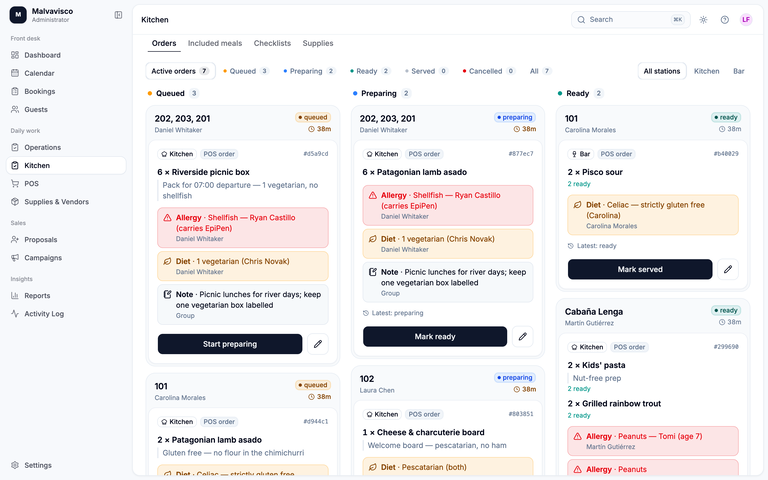
Lodge kitchen software tells the cook how many meals to make each day, for whom and with which allergies, using the lodge’s own bookings. In Malvavisco, included meals are counted without being charged again, orders become kitchen tickets per service, and supply orders and receipts keep the stock current.
From a booking to tomorrow’s meal count
- 01
Say what each stay includes
In settings, choose which meals a room stay or a service includes, and the rule for arrival and departure days, for example dinner on the day guests arrive and breakfast on the day they leave.
- 02
Bookings add their meals
Each confirmed stay adds its meals to the dates it covers. A guided day that includes a shore lunch is counted once the day is scheduled, for the anglers on it.
- 03
The cook reads the brief
Meal planning lists each day’s quantities by meal, the bookings and rooms behind them, and every guest’s dietary restrictions by name.
- 04
Changes flow through
A party that leaves early drops its future meals. A changed allergy has to be acknowledged on the tickets already in the kitchen.
- 05
Adjust with a reason
Staff can override a count; Malvavisco keeps the calculated number, the new one and the reason it changed.
Meals, tickets and supplies on one kitchen screen
What the kitchen sees, and where it stops.
It works the same for a fishing lodge, a hunting camp or a guest ranch.
Included meals without double charging
Breakfast, lunch, dinner and picnic or shore lunches that are part of a stay are planned, not charged. When an included meal goes through the kitchen as a ticket, it is served through that ticket, so the same meal can’t be counted twice from two screens. Extras the guest buys, a bottle of wine or a birthday cake, are charged to the booking from the point of sale.
The daily dietary brief
Allergies and dietary needs come from each guest’s profile and travel with every ticket. When a restriction changes, the kitchen has to acknowledge it before preparing or serving.
Tickets per service
Products routed to the kitchen or the bar become tickets that move from preparing to ready to served, with partial-ready quantities, notes and a reason for any cancellation. The point of sale sees when an order is ready. The kitchen screen checks for new tickets every few seconds while it is open, and disables its buttons when its data goes stale rather than letting the team act on old orders.
Supply orders and receipts
Supply requests become orders emailed to your vendors. When the delivery arrives, it is received once into stock, and the stock screen shows what is below its par level. Supply list templates save retyping the weekly order, which matters when the boat or the plane brings food once a week.
Checklists
Checklists you write, such as opening or closing the kitchen, become tasks the kitchen role can start, complete, fail or escalate.
What it doesn’t do
- No recipes, menu planning or ingredient-level stock: inventory counts the products you buy and sell, not the flour in a recipe
- No kitchen printer: tickets are on screen
- No offline mode: the kitchen screen needs a connection (what that means on satellite internet)
Lodge kitchen features compared
Fishing Outfitter plans menus and shopping lists from ingredients, which Malvavisco doesn’t. Malvavisco counts meals from the stays and runs tickets per service, which neither of the other kitchen pages mentions.
| Feature | Malvavisco | LodgeRunner | Fishing Outfitter |
|---|---|---|---|
| Meal counts from the stay | Counts per day from arrival and departure rules and scheduled guided days | A meal schedule per party: enter the first and last mealSource | Meals planned for each trip daySource |
| Dietary needs | Daily dietary brief by guest name; changes acknowledged on tickets | Dietary preferences shown in red on the booking and carried to later bookingsSource | Dietary flags in the cook portal, with each trip’s menu and headcountSource |
| Kitchen staff view | Kitchen role with meal planning, tickets, checklists and supplies | Mobile-friendly kitchen portal with dietary notes, arrivals, departures, the meal calendar and the room gridSource | Cook portal with its own loginSource |
| Order tickets | Kitchen and bar tickets from preparing to ready to served | Not mentioned on its kitchen pageSource | Not mentionedSource |
| Menus and ingredients | Not built | Unlimited meal types, each with its own optionsSource | Camp menus; ingredients roll up into a shopping listSource |
| Supplies | Supply orders emailed to vendors and received into stock | Not mentioned on its kitchen pageSource | Shopping list grouped by store, built automaticallySource |
| Price | Quoted after a demo | Most lodges $100–$300 a monthSource | Meal planning on the Business plan, $179 a monthSource |
Each competitor cell comes from that company’s own website, checked on 23 October 2026. Details may have changed since.
What’s in the kitchen, and what isn’t
| Feature | Malvavisco | How it works |
|---|---|---|
| Meal counts from arrivals and departures | Yes | Counted per day and meal from each stay’s dates and your arrival and departure rules. |
| Included meals without a second charge | Yes | Meals in the stay are planned, not billed; extras go on the booking. |
| Shore and packed lunches on guided days | Yes | Counted when the guided day is scheduled, for the people on it. |
| Daily dietary brief | Yes | Restrictions by guest name, acknowledged when they change. |
| Kitchen and bar tickets | Yes | Preparing, ready, served, with partial quantities and reasoned cancellations. |
| Manual overrides | Yes | Kept alongside the calculated number, with a reason. |
| Supply orders to vendors | Yes | Emailed from Malvavisco. |
| Supply receipts into stock | Yes | Received once; items below par level show on the stock screen. |
| Kitchen checklists | Yes | Tasks the kitchen can start, complete, fail or escalate. |
| Recipes and ingredient stock | No | Stock counts the products you buy and sell, not recipe ingredients. |
| Menu planning | No | Plan menus on paper or in a spreadsheet; Malvavisco gives you the counts. |
| Kitchen printer | No | Tickets live on screen. |
| Offline kitchen screen | No | Its buttons disable when its data goes stale. |
A daily prep list for a lodge kitchen
Download the lodge kitchen prep list (CSV). It opens in Excel, Google Sheets or Numbers.
One row per dish and service, with these columns:
| Column | What goes in it |
|---|---|
| Date | The day you are cooking for |
| Service | Breakfast, packed lunch, shore lunch, dinner or a special |
| Dish | What is being made |
| Portions | How many, from the day’s meal count |
| Diet notes | Gluten-free, vegetarian and allergies, by guest name where it matters |
| Prep by | The time it has to be ready, such as 06:15 for lunches leaving on the boats |
| Done | Initials when it is ready |
The sample rows show one day at a 12-guest fishing lodge; replace them with your own. Fill the sheet the night before from tomorrow’s meal counts, which also gives the kitchen a paper copy if the internet drops. To work out the counts by hand, use the lodge meal count planner; in Malvavisco, they come from the bookings.
Lodge kitchens ask us
Count every guest present at each meal: arrivals usually start with dinner and departures end with breakfast, plus staff who eat on site. Guided days add packed or shore lunches for the people going out. Malvavisco does this from the bookings; the free meal count planner does it by hand.
No. Meals that are part of the stay are planned for the kitchen without a charge. Anything extra the guest orders is charged to the booking once.
Yes. Dietary restrictions from each guest’s profile appear by name in meal planning and on every ticket, and a change has to be acknowledged before the dish is prepared or served.
No. Malvavisco gives the kitchen counts, dietary needs, tickets and supplies. Menus and recipes stay with the cook; some guide tools, such as Fishing Outfitter’s Business plan, plan menus and shopping lists from ingredients.
Yes. Any included meal works the same way, whether it is a 4 a.m. breakfast in a hunting camp or a cookout on a ranch. Meals are counted from who is in camp each day.
No. It needs a connection. When its data goes stale it disables its buttons, so nobody prepares from old orders; write or print tomorrow’s prep list the night before as a backup.